Process
A process is the abstraction of a running program by the OS. At any instant in time, we can summarize a process by taking an inventory of the different pieces of the system it accesses or affects during the course of its execution.
Machine state
To understand what constitutes a process, we have to understand its machine state: what a program can read or update when it is running. At any given time, what parts of the machine are important to the execution of the program
- Memory - Instructions lie in memory; the data that the process reads and writes sits in memory as well. Thus the memory that the process can access (called its
address space) is part of the process - Registers - Many instructions explicitly read or update registers and thus they are important to the execution of the process
- PC (Program Counter) - Tells us which instruction of the program is currently being executed
- Stack pointer / Frame pointer - Used to manage the stack for function parameters, local variables, and return addresses
- Persistent Storage - Programs often access persistent storage. Such I/O information might include a list of the files the process currently has open.
Process APIs
These APIs are available in some form on any modern OS:
- Create - When you type a command into the shell, or click on an icon, the OS is invoked to create a new process to run the program you have indicated.
- Destroy - Many processes will run a bit and exit by themselves when complete; when they don’t however, the user may wish to kill them
- Wait - Sometimes it is useful to wait for a process to stop running
- Miscellaneous Control - Most OS provide a way to suspend a process and then resume it
- Status - There are usually interfaces to get some status information about a process as well, such as how long it has run for, or what state it is in.
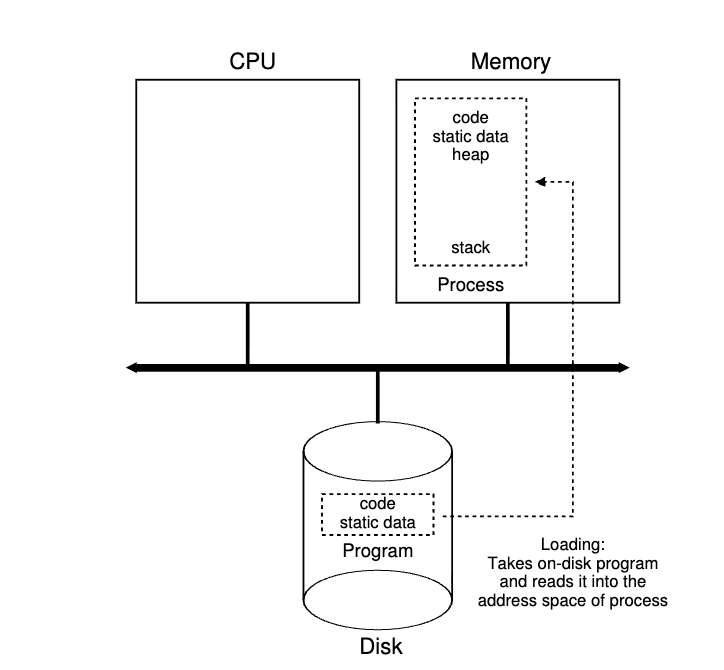
Process creation
- The first thing that the OS must do to run a program is to load its code and any static data (e.g initialized variables) into memory, into the address space of the process. Programs initially reside on disk in some kind of executable format. In early OS, the loading process is done all at once before running the program. Modern OS perform the process
lazilyby loading pieces of code or data as they are needed during the program execution. - Once the code and static data are loaded in memory there a few other things the OS needs to do before running the process:
- Memory needs to be allocated for the stack (used for local variables, function parameters, and return addresses) - The OS allocates this memory and gives it to the address. The OS will likely initialize the stack with arguments; it will fill in the parameters of the
main()function - The OS may also allocate some memory for the program’s heap; It is used for dynamically allocated data; It is needed for data structures such as linked lists, hash tables, trees… The heap will be small at first; as the program runs and requests more memory, the OS may get involved and allocate more memory to the process
- In Unix, each process by default has three open
file descriptors (stdin, stdout, stderr)After the initializations, the process runs the entry point of the programmain(). By jumping to the main routine, the OS transfers control of the CPU to the newly-created process.
- Memory needs to be allocated for the stack (used for local variables, function parameters, and return addresses) - The OS allocates this memory and gives it to the address. The OS will likely initialize the stack with arguments; it will fill in the parameters of the
Process statuses
- Running - The process is running on a processor
- Ready - The process is ready to run but for some reason the OS has chosen not to run it at this given moment
- Blocked - The process has performed some kind of operation that makes it not run until some other event takes place. A common example: When a process initiates an I/O request to a disk, it becomes blocked and thus some other process can use the processor.
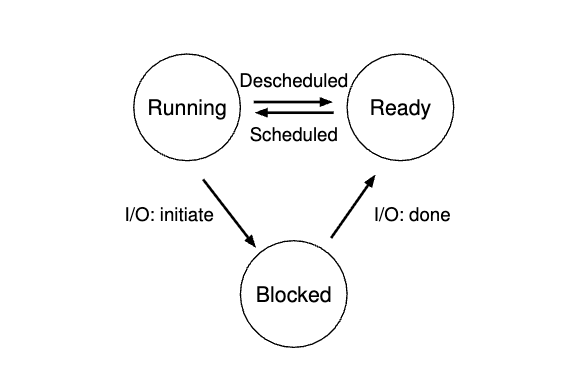
Being moved from ready to running means the process has been scheduled. Being moved from running to ready means the process has been descheduled. Once a process has become blocked, the OS will keep it as such until some event occurs.